Skip to content
User's Blog!
Menu
Close
Home
About
Blog
Contact
View Categories
Home
Docs
ระบบงานทันตกรรม
สรุปค่าใช้จ่าย
สรุปค่าใช้จ่าย
< 1 min read
Listen
0:00
/
0:09
1×
Copy page
Copy page
Copy this page as Markdown for LLMs
View as Markdown
Open this page as plain Markdown
(opens in a new tab)
Open in ChatGPT
Ask questions about this page
(opens in a new tab)
Open in Claude
Ask questions about this page
(opens in a new tab)
Open in Google AI Studio
Ask questions about this page (Google account required)
(opens in a new tab)
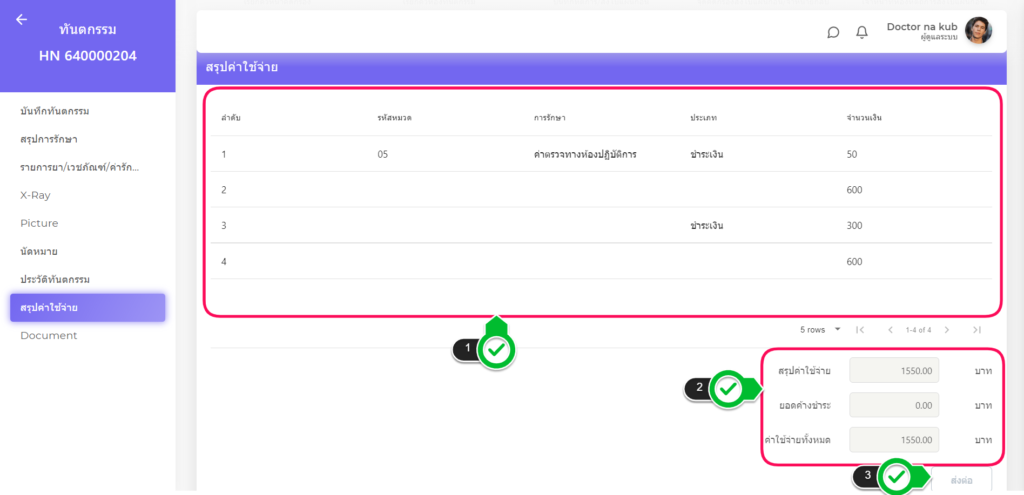
รูปที่ 1 – หน้าสรุปค่าใช้จ่าย
หน้าสรุปค่าใช้จ่าย – จะแสดงค่าใช้จ่ายของผู้ป่วยรายนั้
น ๆ ทั้งหมด โดยจะแสดงตามรูปที่ 1 หัวข้อที่ 1
และมีสรุปจำนวนเงินทั้งหมด
ตามรูปที่ 1 หัวข้อที่ 2
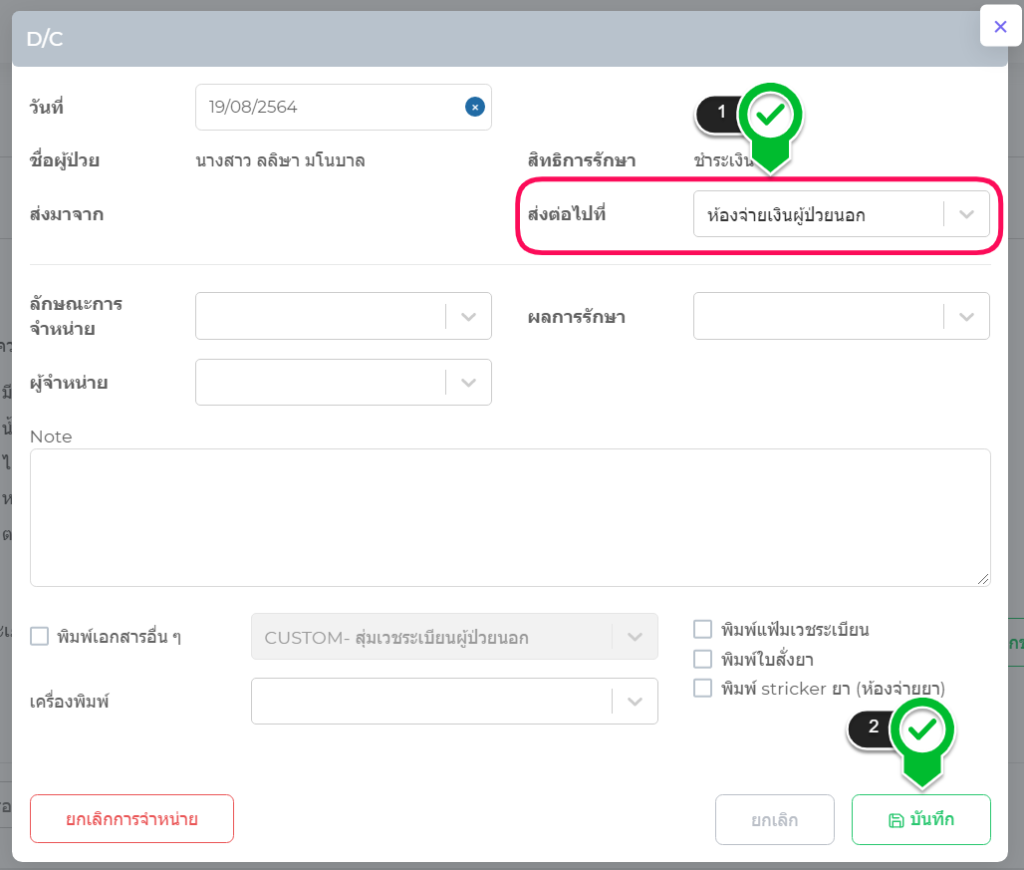
รูปที่ 2 – หน้าส่งต่อ
ส่งต่อผู้ป่วย – ผู้ใช้งานสามารถส่งต่อผู้ป่วยไปยังแผนกต่าง ๆ ได้โดยการกดปุ่ม “ส่งต่อ”
ตามรูปที่ 1 หัวข้อที่ 3
จะแสดงหน้าต่าง
ตามรูปที่ 2
ซึ่งจะต้องเลือกแผนกที่จะส่งต่อ
ตามรูปที่ 2 หัวข้อที่ 1
หลังจากนั้นกดปุ่ม “บันทึก”
ตามรูปที่ 2 หัวข้อที่ 2
Updated on August 20, 2021
นัดหมาย
บันทึกทันตกรรม
Powered by
BetterDocs